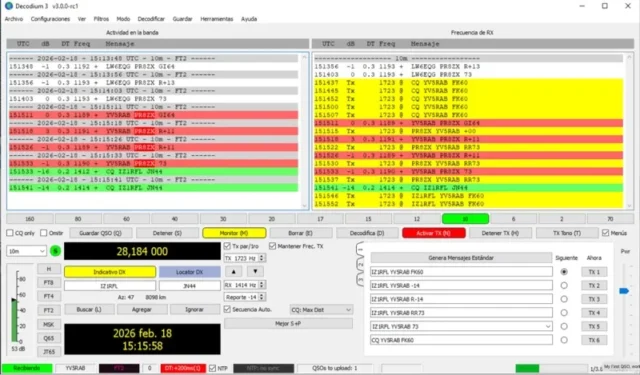
In recent years, one of the most dynamically evolving areas of the amateur radio community has been digital modes—with FT8 becoming exceptionally popular. Originally not designed for contesting, FT8 contesting has now become widespread worldwide.
In this article, we’ll explore what FT8 is, how it works, how to participate in FT8 contests, the necessary equipment, key strategies, and practical tips for success—whether you’re a beginner or an experienced operator.
If you’re interested in the modern world of amateur radio, this guide is for you!
What is FT8?
FT8 is a digital amateur radio mode developed by Joe Taylor K1JT and his team in 2017.
The name stands for:
FT = Franke-Taylor (after the two developers)
8 = 8-FSK modulation (uses 8 frequency positions)
The goals of FT8 are:
Operate under extremely weak signal conditions
Fast, automated QSO handling
Short cycles: communication in 15-second intervals
Thanks to this, FT8 can decode signals down to -24 dB S/N—under conditions where traditional SSB or CW would not be usable.
Popular bands
HF bands (1.8–30 MHz): especially 80 m, 40 m, 20 m, 17 m, 15 m, 10 m
VHF: 6 m and 2 m
UHF: experimental use on 70 cm
Example FT8 frequencies:
| Band | FT8 frequency (kHz) |
|---|---|
| 160 m | 1840 |
| 80 m | 3573 |
| 40 m | 7074 |
| 30 m | 10136 |
| 20 m | 14074 |
| 17 m | 18100 |
| 15 m | 21074 |
| 12 m | 24915 |
| 10 m | 28074 |
| 6 m | 50313 |
FT8 and contesting
While FT8 was not originally created as a contest mode, several FT8-specific contest formats have emerged:
FT Roundup (supported by ARRL)
EU FT8 Contest
WW Digi DX Contest (under WW Digi rules)
FT8 DX Contest
Club and national local contests
These contests often use special software add-ons or contest modes (more on this later).
How does an FT8 QSO work?
FT8 communication is strictly structured:
CQ call (typically automated)
Responder replies
Signal report exchange (e.g. -16 / -08)
73 exchange
Logging
All of this happens in about 4–5 cycles, so an FT8 QSO is completed in about 1–1.5 minutes.
An FT8 QSO is not a conversation, but a protocol-driven exchange.
What software is needed for FT8?
WSJT-X
WSJT-X is the official free software supporting FT8 mode.
Key features:
FT8 transmit/receive
Spectrum display
Automated QSO processing
Logging (ADIF export)
JTDX
An optimized FT8 software alternative:
Better decoding sensitivity
Special DX features
Logging programs
N1MM Logger+ (with FT8 plugin)
Log4OM
DXLab Suite
ClubLog for automatic uploads
Extra tools
Grid Tracker (visual display)
JTAlert (DXCC, WAS, special alerts)
What equipment is needed for FT8?
Radio
An SSB-capable transceiver
Digital mode support (USB-D, Data, Digi)
Popular models:
Icom IC-7300
Yaesu FT-991A
Kenwood TS-590SG
Elecraft K3/K4
SDR radios: FlexRadio, SunSDR, Anan, etc.
Sound card / interface
Radios with built-in USB sound cards → simple USB connection
External interfaces: SignalLink USB, microHAM, RigExpert
Antenna
Full-band coverage antenna recommended
Examples:
Dipole
Vertical
End-Fed
Yagi (on higher bands)
Computer
Windows, Linux, MacOS — WSJT-X works on all major platforms
No need for a high-performance PC — older laptops work fine
Time synchronization
Very important! FT8 requires ±1 second accuracy
Tools:
Meinberg NTP
Dimension 4
Chrony (Linux)
How does an FT8 contest work?
Rules
Special contest rules (e.g. name, locator, country codes exchanged)
Scoring: by band, DXCC, grid square
Duration: 4–24 hours
Mode: FT8, contest-optimized version (such as MSHV or WSJT-X contest mode)
Logging
Log submission in ADIF / Cabrillo format
Automatic logging is recommended (e.g. N1MM Logger+ FT8 integration)
Uploads
ClubLog
LotW
eQSL
Organizer’s contest portal
Tips for FT8 contesting
Settings
Optimal power: not too strong (max 30 W on HF), but enough for solid decoding
IMD monitoring: clean signal
EQ settings: flat response
Antenna strategy
Rotatable antenna is advantageous
Band switching: track propagation → e.g. 20 m daytime, 40 m evening
Band monitoring
Monitor the band → DX spots + spectrum
Grid Tracker: where are missing QSOs?
Automation
WSJT-X auto-seq: automated QSO flow
JTDX: faster decoding, efficient pileup handling
Contest monitoring
Watch DX cluster
Reverse Beacon Network (RBN) → where is your signal heard?
Good practices
Always check time synchronization!
Verify log after contest
Avoid duplicate QSOs (no extra points)
FT8 contest examples
| Contest name | Date | Notes |
|---|---|---|
| ARRL FT Roundup | December | USA + international |
| EU FT8 Contest | May | European-focused FT8 contest |
| WW Digi DX Contest | August | All digital modes (FT8/FT4) |
| FT8 DX Contest | Various | DXCC-focused |
Common mistakes among beginners
Poor time sync → no one replies
Too much power → IMD, causing QRM
Incorrect antenna
Auto-mode left incomplete → QSO fails
Incorrect log format → QSO not scored
Advanced tips
SO2R FT8 contesting: operate on two bands simultaneously
Multiband strategy: watch when each band opens
Grid chasing → hunting rare grid locators
DXCC + WAS parallel FT8 chasing
Future trends
FT4: faster FT8 alternative, ideal for contesting
AI-based decoding → even weaker signals
Distributed FT8 clients → multi-antenna, remote receiving
Remote operation → fully automated FT8 remote control
Image(s) used in this article are either AI-generated or sourced from royalty-free platforms like Pixabay or Pexels.
This article may contain affiliate links. If you purchase through these links, we may earn a commission at no extra cost to you.
Get the weekly RF & IT briefing
Radio guides, RF calculators, AI, Windows, Linux and satellite communication explainers. One useful email per week. No spam.