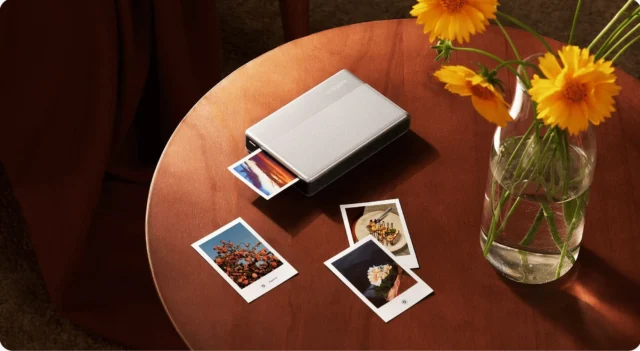
The Xiaomi Portable Photo Printer 1S is a compact Bluetooth photo printer for users who want to turn smartphone photos into small physical prints without dealing with ink cartridges, toner, ribbons or a traditional desktop printer. It is not a replacement for a full-size photo printer, and it is not designed for large framed prints. Its purpose is more specific: it takes a photo from a smartphone, sends it through the Xiaomi Home app, and produces a small 2 x 3 inch adhesive-backed print that can be used in journals, scrapbooks, travel notebooks, school projects, gifts, labels or memory boards.
That narrow focus is exactly what makes the product interesting. Smartphone photography has made taking pictures almost effortless, but it has also pushed most photos into a purely digital life. A picture may be taken, shared once in a message, uploaded to a cloud album and then forgotten among thousands of other images. A portable photo printer like the Xiaomi Portable Photo Printer 1S tries to reverse that pattern by making physical prints simple again.
The printer uses ZINK, short for Zero Ink, a heat-based printing technology where the colour-forming material is embedded inside the special paper. Instead of spraying ink or transferring dye from a ribbon, the printer activates colour layers inside the paper with heat. This keeps the printer small, clean and mechanically simple. The 1S offers a 313 x 512 dpi print resolution, a 2 x 3 inch / 50 x 76 mm output size and an approximate print time of 45 seconds per photo. It connects through Bluetooth 5.2 and works with Android and iOS devices via the Xiaomi Home app.
This review looks at the Xiaomi Portable Photo Printer 1S as a real-world consumer device rather than as a novelty gadget. The key question is not whether it can compete with a professional photo printer, because it cannot and is not meant to. The more relevant question is whether it delivers enough convenience, acceptable print quality and practical value to justify its place in a bag, drawer, desk setup or travel kit.
What the Xiaomi Portable Photo Printer 1S is
The Xiaomi Portable Photo Printer 1S is a pocket-sized instant photo printer for smartphones and tablets. It prints small 2 x 3 inch photos, roughly the size of a credit card, using special self-adhesive ZINK photo paper. The print can be kept as a normal mini photo, placed in an album, used as a label or peeled from the backing and stuck into a notebook, planner, scrapbook or gift card.
This product is best understood as a casual memory printer. It is not aimed at photographers who need colour-critical output, nor at households looking for a general-purpose printer. It is designed for people who want a fast, low-maintenance way to print selected photos directly from their phone.
The workflow is simple. The user opens the Xiaomi Home app, selects a photo, optionally crops or edits it, connects to the printer over Bluetooth and sends the image to print. There is no ink tank to fill, no cartridge to replace and no ribbon cassette to install. The consumable is the paper itself, because the colour chemistry is built into the ZINK sheets.
This makes the product especially attractive for occasional printing. A conventional inkjet printer may become troublesome if it is rarely used, because liquid ink can dry out and printheads may need cleaning. A ZINK printer avoids that specific problem. It can sit unused for a while and still remain relatively simple to operate, as long as the battery is charged and the correct paper is available.
Core specifications
The Xiaomi Portable Photo Printer 1S uses heat-sensitive ZINK printing technology and produces 2 x 3 inch / 50 x 76 mm prints. Its listed print resolution is 313 x 512 dpi, which is suitable for small-format casual prints. Each photo takes approximately 45 seconds to print, although the total experience also depends on image preparation, app response and Bluetooth connection.
The paper tray holds 10 sheets of photo paper plus one orange calibration card. The printer supports common image formats such as JPEG, PNG and HEIF, which covers the normal output of most modern smartphones. Connection is handled through Bluetooth 5.2, and the printer can support multi-user connection for up to three users. That makes it more practical at small gatherings, because several people can connect without constantly resetting the device.
The printer works through the Xiaomi Home app and is intended for Android and iOS devices. It charges through USB-C and uses a built-in lithium-ion polymer battery, commonly listed as a 500 mAh, 7.4 V unit. Its body is compact and lightweight, generally around 180 g and roughly 124 x 82 x 22 mm depending on the market listing.
The important point is that this is a true small-format mobile printer. The output size is not postcard size, not 10 x 15 cm and not suitable for large photo frames. It is a compact sticker-photo format, and the product should be judged within that category.
Design and build quality
The Xiaomi Portable Photo Printer 1S follows Xiaomi’s familiar minimalist design language. It is compact, white, clean and visually simple, with very little external clutter. The rectangular body is thin enough to fit into a small bag, travel pouch, desk drawer or stationery organizer. It looks more like a modern mobile accessory than a traditional printer.
The physical controls are minimal because most of the interaction happens in the Xiaomi Home app. This design choice makes sense for a product whose main source device is a smartphone. The printer does not try to act like an independent photo kiosk. It is an app-controlled accessory, and the phone remains the display, editor and image library.
The small size is one of the strongest design advantages. A device of this class can be carried to family events, classrooms, hobby meetings, travel days or casual gatherings without needing a dedicated bag. It is also small enough to live permanently on a desk without becoming annoying.
The clean exterior also has practical value. Portable photo printers are often used by casual users, students, families and people who do not want to manage technical printer settings. A complicated control panel would work against the intended experience. Xiaomi keeps the device simple, and that simplicity is appropriate.
The limited paper tray capacity is not a major flaw in context. Ten sheets may sound low, but this is not a batch printer. It is designed for printing a few selected photos at a time. If someone wants to print an entire album in one session, this is the wrong product category.
How ZINK printing works
ZINK printing is the defining feature of the Xiaomi Portable Photo Printer 1S. Unlike inkjet printers, it does not spray liquid ink onto paper. Unlike dye-sublimation printers, it does not use a colour ribbon. Instead, the special ZINK paper contains colour-forming layers that react to heat.
Inside the printer, a thermal printhead applies carefully controlled heat to the paper. Different heat levels and durations activate different colour elements in the sheet, creating the final image. This is why the printer can operate without ink cartridges, toner or ribbon cassettes.
The practical benefit is obvious: there is much less to maintain. The user does not need to worry about ink drying out, cartridge alignment, clogged nozzles or ribbon replacement. The printer remains compact because the printing system is largely built around the paper and the thermal head.
However, ZINK has trade-offs. It is convenient, but it is not the highest-quality photo printing technology. Colours may look less natural than high-quality dye-sublimation or inkjet output. Contrast can be limited, and subtle gradients or skin tones may not always match the original smartphone image. Dark photos can lose detail, while very bright or high dynamic range images may not translate perfectly to the small print.
That does not make the technology bad. It simply defines the category. ZINK is excellent for casual, portable, low-maintenance printing. It is less suitable for colour-critical photography. The Xiaomi Portable Photo Printer 1S should therefore be judged as a creative mini printer, not as a professional photographic device.
Print quality
The print quality of the Xiaomi Portable Photo Printer 1S is good enough for its intended use, but expectations must be realistic. The 313 x 512 dpi resolution is acceptable for 2 x 3 inch prints because the output is physically small. On this format, portraits, pet photos, travel snapshots, food images and simple decorative prints can look sharp enough to be pleasing.
The printer performs best with bright, clean images that have a clear subject. A well-lit portrait, a close-up of a pet, a colourful meal, a simple travel scene or a product shot with a clean background will usually produce a more satisfying result than a dark, complex or heavily detailed image. This is partly due to the small print size and partly due to the limitations of ZINK colour reproduction.
Where the printer struggles is with demanding photographic material. Large landscapes with subtle skies, night photos, concert images, scenes with deep shadows and pictures with many tiny faces are less ideal. The small format cannot show much fine detail, and the ZINK process may not preserve subtle tonal transitions as well as a larger photo printer.
The output also has a slightly stylized character. This can be positive if the goal is a fun instant-photo look. For journals, scrapbooks and casual keepsakes, the result is usually attractive enough. For professional product images, accurate skin tones or archival photo work, it is not the right tool.
The most useful way to evaluate the print quality is to think of the printer as a pocket memory printer. It turns a digital moment into a physical object. It is not about perfect colour science; it is about immediacy, portability and the emotional value of a printed photo.
Colour accuracy and image processing
Colour accuracy is one of the key limitations of almost every small ZINK printer, and the Xiaomi Portable Photo Printer 1S is no exception. Photos may not look exactly like they do on the phone screen. They may appear slightly warmer, cooler, flatter, more contrasty or less saturated depending on the original image, paper condition and app processing.
Part of this difference is unavoidable. A smartphone display is bright, backlit and often tuned to make images look vivid. A printed ZINK photo is reflective and depends on heat-activated colour layers. The two viewing conditions are fundamentally different. Even a perfect printer would not make a small physical sticker look exactly like a glowing OLED or LCD screen.
The best practical approach is to prepare images with the printer’s limitations in mind. Very dark photos should be brightened before printing. Images with low contrast can benefit from a slight contrast adjustment. A tighter crop around the subject often helps because the final print is small. Busy backgrounds, tiny details and small text should be avoided unless they are not important.
Users who expect lab-grade colour accuracy may be disappointed. Users who want charming, casual mini prints will probably find the quality acceptable. The Xiaomi Portable Photo Printer 1S is not built for proofing professional photos. It is built for making small memories tangible.
Print size and paper format
The 2 x 3 inch / 50 x 76 mm paper size is central to the product’s identity. This format is small enough to keep the printer portable but large enough to be useful in notebooks, planners, scrapbooks and small gifts. It is close to a credit-card-sized print, which makes it easy to handle and store.
The adhesive backing gives the format extra value. A normal mini photo is pleasant, but a sticker photo is more versatile. It can be placed directly into a travel journal, attached to a birthday card, used in a scrapbook, added to a school project or stuck onto a planner page without glue or tape.
The limitation is equally clear. This is not a classic family album format. People who expect standard 10 x 15 cm prints will find the output too small. It is also not ideal for wall frames, formal photo gifts or detailed landscape photography.
The Xiaomi Portable Photo Printer 1S works best when the small format is treated as a feature, not as a compromise. It is a printer for small visual memories, creative pages and physical stickers. It is not a replacement for a photo lab.
Paper handling and calibration card
Paper handling is simple, but it still matters. The printer accepts 10 sheets of ZINK photo paper plus one orange calibration card. The calibration card is part of the printing system and should not be thrown away before use. It helps the printer identify and calibrate the paper pack, which can affect alignment and colour output.
The user should load the paper exactly as instructed. Incorrect orientation, missing calibration or overloading the tray may cause feeding errors, misalignment or poor print quality. This is not unique to Xiaomi; it is common across compact ZINK printers.
Because the paper is the consumable, long-term cost depends almost entirely on replacement paper pricing. The printer itself may be affordable, but every print uses a special sheet. For occasional use, this is not usually a problem. For heavy printing, the cost per photo can become significant.
It is also worth storing the paper properly. ZINK paper is heat-sensitive by design, so it should be kept away from excessive heat, direct sunlight and moisture. Finished prints should also be treated sensibly if the user wants them to last.
App experience
The Xiaomi Portable Photo Printer 1S is controlled through the Xiaomi Home app. This is both an advantage and a limitation. The app provides the visual interface for selecting photos, cropping, applying basic edits and sending the image to the printer. Without the app, the printer loses much of its practical value.
Since the printer depends on a smartphone for image selection, editing and Bluetooth printing, the phone itself remains an important part of the experience. A powerful Xiaomi phone is not required for printing, but users who already follow Xiaomi’s mobile hardware, from mainstream models to Xiaomi gaming phones, will probably find the app-based workflow familiar.
For most users, the app-based workflow is natural because the phone is already where the photos are stored. It is easier to crop and adjust an image on a smartphone screen than on a tiny printer display, especially since this printer does not need its own complex interface. The app may also provide creative functions such as borders, filters, collage layouts, watermarks or AR-style photo features depending on region and software version.
The disadvantage is dependency. Users who dislike account-based ecosystems or app-controlled accessories may not enjoy the setup. App behaviour can change over time, and regional differences may affect available features. This is an important point for buyers who prefer devices that work independently from a cloud-connected app environment.
In everyday use, however, the app requirement is not unusual. Most modern portable photo printers use a similar model. The Xiaomi Home integration is especially logical for users who already own Xiaomi smart devices.
Bluetooth connection and multi-user use
The Xiaomi Portable Photo Printer 1S connects through Bluetooth 5.2. This is a practical choice for a small mobile printer. It avoids the need for Wi-Fi setup, router access or a local network. The user only needs the phone and the printer to be close to each other.
The printer can support up to three connected users, which is useful at parties, family gatherings, classrooms or small events. It does not mean that several prints are produced at the exact same moment, because the printer still works sequentially. But it makes shared use less awkward, because several people can connect without constantly re-pairing the device.
Bluetooth also fits the travel use case. A Wi-Fi printer can be inconvenient away from home, especially in hotels, cars or outdoor settings. A Bluetooth printer is simpler: open the app, connect locally and print.
Connection stability will still depend on phone compatibility, app permissions, battery level and nearby interference. If pairing fails, the first things to check are Bluetooth permissions, app permissions, printer charge and whether another phone is already controlling the printer.
Battery life and charging
The Xiaomi Portable Photo Printer 1S has a built-in rechargeable battery and charges through USB-C. The battery is commonly listed as a 500 mAh, 7.4 V lithium-ion polymer unit. For a printer of this size and purpose, that is reasonable.
This is not a device intended for printing dozens and dozens of photos continuously. It is designed for short sessions: a few photos at a family gathering, several journal stickers, a small batch of travel memories or a handful of event prints. Some market descriptions suggest around 20 photos per charge, but actual results may vary with battery age, temperature, usage pattern and print conditions.
USB-C charging is a practical advantage. It means the printer can usually share a cable with modern phones, tablets, power banks and travel chargers. For trips or events, a small power bank is enough to reduce battery anxiety.
The battery-powered design is one of the reasons the printer makes sense as a portable device. It can be used on a desk, in a hotel room, at a café, during a workshop or at a family event without needing to stay plugged in.
Setup process
The setup process is relatively simple. The user charges the printer, installs the Xiaomi Home app, opens the paper compartment, inserts the ZINK paper and orange calibration card correctly, turns on the printer and pairs it through Bluetooth. After that, printing is handled from the app.
The first print after loading a new paper pack may involve calibration. This is normal. The orange card should not be treated as a failed photo or wasted sheet. It is part of the printer’s setup routine.
Compared with a traditional printer, the process is refreshingly simple. There is no driver installation in the old desktop-printer sense, no ink alignment procedure and no cartridge handling. The main risk is incorrect paper loading, which is easy to avoid by following the instructions carefully.
This simplicity is one of the strongest selling points of the product. It is the kind of printer that can be understood without technical knowledge, which is important for a device often bought as a gift or used casually.
Everyday usability
In everyday use, the Xiaomi Portable Photo Printer 1S is most valuable when the owner already has a reason to print small photos. People who keep journals, planners, travel notebooks or scrapbooks are likely to use it more often than people who only occasionally think about printing pictures.
The printer fits naturally into creative routines. A traveller can print one photo each evening and add it to a notebook. A student can add small visual references to project pages. A parent can print birthday or school-event memories. A hobbyist can use the prints for mood boards, labels or visual notes.
The device is less compelling if it sits unused in a drawer. Like many creative gadgets, its value depends on habit. Someone who enjoys physical stationery will probably find it useful. Someone who keeps all photos digitally may enjoy it for a few days and then stop using it.
As a gift, the product is easy to understand. It has an immediate demonstration effect: take a photo, print it, peel it and stick it somewhere. That makes it more engaging than many generic mobile accessories.
Review: strengths
The strongest advantage of the Xiaomi Portable Photo Printer 1S is convenience. It removes the most annoying parts of traditional printing. There is no ink, no toner, no ribbon and no complicated desktop setup. The printer is small, battery-powered and simple enough to use almost anywhere.
The second major strength is the adhesive photo format. A 2 x 3 inch photo sticker is more useful than it first appears. It can become part of a journal page, a travel diary, a scrapbook, a handmade card or a small visual label. This turns the printer into a creative tool rather than just a miniature photo printer.
The third strength is portability. Its small body and USB-C charging make it suitable for travel, events and casual use outside the home. It is not a device that requires a fixed workspace.
The fourth strength is social use. Multi-user Bluetooth support makes it more practical at small gatherings. Several people can connect, choose photos and print memories without one person controlling the entire process.
The fifth strength is low maintenance. ZINK technology avoids ink drying and cartridge replacement, which is especially useful for users who print only occasionally.
Review: weaknesses
The main weakness is image quality compared with more serious photo printers. The Xiaomi Portable Photo Printer 1S can produce enjoyable mini prints, but it cannot match dye-sublimation or inkjet photo printers for colour fidelity, dynamic range or fine detail.
The second weakness is the small print size. The 2 x 3 inch format is excellent for stickers and notebooks, but too small for traditional photo albums or framed prints.
The third weakness is consumable cost. ZINK paper is convenient, but it is also the main ongoing expense. Anyone planning to print heavily should calculate the cost per print before buying.
The fourth weakness is app dependency. The printer relies on Xiaomi Home for setup, editing and printing. This is normal for the category, but it may not suit users who prefer app-independent devices.
The fifth weakness is limited batch printing. The tray capacity and print speed are fine for casual use but not for high-volume event printing. A large party, wedding booth or commercial event would need a different solution.
Best photo types to print
The Xiaomi Portable Photo Printer 1S works best with photos that remain clear even when viewed small. Bright portraits, selfies, pet photos, simple travel snapshots, colourful food photos and clean object shots are good candidates. Images with a strong subject and simple background usually print better than wide scenes with many small details.
Less suitable images include night photos, concert scenes, dark interiors, wide landscapes, photos with many tiny faces and screenshots full of small text. These images may lose detail or become visually crowded on a 2 x 3 inch print.
A practical rule is to preview the image as a small thumbnail before printing. If the subject is still obvious at thumbnail size, it is more likely to work well on this printer. If the image depends on fine detail, subtle shadow information or exact colour, it is probably not ideal.
Comparison with traditional instant cameras
A portable photo printer and an instant camera both produce small physical photos, but they offer different experiences.
An instant camera captures and prints directly. It is spontaneous, simple and often emotionally charming because the print is tied to a single moment. There is less control, but that is part of the appeal.
The Xiaomi Portable Photo Printer 1S is more controlled. It prints from smartphone photos, which means the user can choose the best shot, crop it, edit it and avoid wasting paper on poor images. It can also print older photos, screenshots, digital designs or images received from others.
For practical use, the Xiaomi printer is often more flexible than an instant camera. A modern smartphone camera is usually better than the lens in a basic instant camera, and the ability to select the best image reduces waste. However, people who want the analog charm of taking and printing in one action may still prefer an instant camera.
Comparison with dye-sublimation portable printers
Dye-sublimation portable printers often produce better photo quality than ZINK printers. They usually use a ribbon-based process and may add a protective overcoat layer. Colours can look more accurate, gradients can be smoother and the final print may feel closer to a traditional lab photo.
The trade-off is size and complexity. Dye-sublimation printers are often larger and may require both paper and ribbon cartridges. They are still portable, but usually not as pocketable or maintenance-free as a ZINK printer.
The Xiaomi Portable Photo Printer 1S wins on simplicity, size and sticker-style convenience. A dye-sublimation printer wins when image quality matters more than portability. A full-size inkjet or online photo lab remains better for larger prints and serious photo output.
The right choice depends on the user’s priority. If the goal is a small creative printer for journals and travel memories, the Xiaomi makes sense. If the goal is the best-looking small photo print, a dye-sublimation model may be a better fit.
Who should buy it
The Xiaomi Portable Photo Printer 1S is best for people who enjoy physical memories in small formats. Journal users, scrapbook makers, students, travellers, families and creative stationery fans are the most obvious target groups. It is also useful for anyone who wants to print a few selected smartphone photos without maintaining a traditional printer.
It can also work well as a gift because the concept is immediately understandable. The recipient does not need to be technically experienced. The device has a simple appeal: choose a photo, print it, peel it and stick it somewhere.
It is especially suitable for people who print occasionally rather than constantly. If someone wants to print a few memories per week or a handful of photos during trips and events, the device fits that pattern well.
Who should not buy it
The Xiaomi Portable Photo Printer 1S is not the right choice for professional photographers, users who need accurate colour reproduction, or anyone who expects standard-size photo prints. It is also not suitable for people who want to print large batches cheaply.
It should not be bought as a replacement for a home printer. It cannot print A4 documents, school worksheets, shipping labels or standard family photo sizes. It is a dedicated mini photo printer with a specific creative use case.
Users who dislike app-controlled devices should also think carefully before buying. The printer’s usability depends heavily on Xiaomi Home, so the app is part of the product experience.
Paper cost and long-term value
The long-term value of the Xiaomi Portable Photo Printer 1S depends on how often it is used and how much the replacement paper costs in the buyer’s country. The printer itself may be affordable, but every print uses a special ZINK sheet. Since the colour system is inside the paper, ordinary photo paper cannot replace it.
For occasional use, the cost is acceptable because the printer is not producing large volumes. A few prints during travel, a handful of journal stickers or some small family keepsakes will not usually feel expensive. For heavy use, however, the cost per print becomes more important.
Before buying, it is worth checking the local price and availability of official or known-compatible 2 x 3 inch ZINK paper. A portable photo printer is much less useful if replacement paper is hard to find or disproportionately expensive.
Practical tips for better prints
The easiest way to improve results is to start with bright, clear photos. ZINK printers generally do better with well-lit images than with dark scenes. A slight brightness or contrast adjustment before printing can help, especially if the photo was taken indoors.
Cropping is also important. Because the final print is small, the subject should fill more of the frame than it might in a normal smartphone image. A wide photo with a tiny person in the middle may look fine on a phone screen but weak on a 2 x 3 inch print.
Paper handling also affects quality. The ZINK sheets should be kept clean, dry and flat. The calibration card should be used correctly, and the paper should be loaded in the right orientation. Users should avoid bending the sheets or touching the printable surface unnecessarily.
Finished prints should be kept away from excessive heat and moisture. They are convenient and durable enough for casual use, but they are not the same as archival lab prints.
Common problems and likely causes
If the print looks too dark, the original image is often the cause. Phone screens make photos look brighter because they are backlit. A printed photo has no backlight, so underexposed images become more obviously dark. Brightening the image before printing usually helps.
If colours do not match the phone screen, that is partly normal for this technology. The printer uses heat-activated ZINK paper, while the phone display uses a completely different method of showing colour. Small differences should be expected.
If the printer does not connect, the most likely causes are Bluetooth permission problems, low battery, app permission issues or another phone already controlling the device. Restarting Bluetooth, checking the Xiaomi Home app and charging the printer are sensible first steps.
If the paper jams or the image is misaligned, the paper may have been inserted incorrectly, the tray may be overloaded or the calibration card may not have been used properly. Correct paper loading is more important than it looks.
If the printer stops during printing, battery level and paper feed should be checked first. A small portable printer depends heavily on stable power and correct paper movement.
Xiaomi Portable Photo Printer 1S for journaling
Journaling is one of the strongest use cases for this printer. The 2 x 3 inch adhesive format fits naturally into notebooks. A printed photo can be added directly to a page without glue, tape or photo corners.
For bullet journals, the printer can be used for monthly memories, travel logs, habit trackers, mood boards, study pages or personal highlights. The small size leaves enough room for handwriting, dates, drawings and other page elements.
This is where the printer’s limitations become less important. A journal photo does not need to be professionally accurate. It needs to capture a moment and fit neatly into a personal page. The Xiaomi Portable Photo Printer 1S does that well.
Xiaomi Portable Photo Printer 1S for travel
For travel, the printer is attractive because it is small, light and battery-powered. It can be used in a hotel room, café, train, car or campsite. Travellers can print selected memories during the trip instead of waiting until they return home.
The main practical issue is paper supply. Replacement ZINK paper may not be easy to find everywhere, so travellers should pack enough sheets before leaving. The compact paper packs are easier to carry than a larger printer setup, but they still need to be planned.
USB-C charging is useful during travel. The printer can usually share charging equipment with phones and power banks, reducing the number of accessories required.
Xiaomi Portable Photo Printer 1S for families
Families can use the printer for birthdays, school events, holidays, children’s crafts and small memory albums. Children often enjoy the immediate result of seeing a phone photo become a physical sticker.
For parents, the main appeal is simplicity. There are no ink cartridges to manage and no desktop printer settings to adjust. The process is visual and easy to understand.
Adult supervision is still sensible, especially with younger children. The printer contains a battery, moving parts and heat-based printing components, and the paper should be handled correctly.
Xiaomi Portable Photo Printer 1S for events
The Xiaomi Portable Photo Printer 1S can work well at small events, but it should not be treated as a high-volume event printer. The tray capacity and print speed are suitable for casual sharing, not for printing hundreds of guest photos.
At a birthday party, family gathering, school activity or hobby meeting, it can be used to create small souvenirs. Guests can print a favourite photo, add it to a guestbook or use it as a sticker. The multi-user Bluetooth feature helps because several people can connect and take turns.
For weddings, corporate events or larger photo booth setups, a faster dye-sublimation printer would be more appropriate. The Xiaomi printer is better suited to intimate, low-volume use.
Durability and maintenance
The Xiaomi Portable Photo Printer 1S is low-maintenance by design. Since there is no ink cartridge or ribbon, there are fewer consumables and fewer parts for the user to manage. The main responsibilities are keeping the printer charged, keeping the paper clean and avoiding dust inside the paper compartment.
The printer should be treated like a small consumer electronic device rather than rugged field equipment. It is portable, but it should not be dropped, crushed in luggage or exposed to moisture. A small pouch or case is useful if it is carried frequently.
Because ZINK paper reacts to heat, both blank paper and finished prints should be stored away from extreme temperatures. This is especially relevant in cars, direct sunlight or hot travel bags.
Is the Xiaomi Portable Photo Printer 1S worth buying?
The Xiaomi Portable Photo Printer 1S is worth buying if the user understands its category. It is a small, fun, low-maintenance printer for smartphone photo stickers. It is not a serious photo printer, a document printer or a cheap high-volume printing solution.
As a compact creative device, it makes sense. The combination of ZINK technology, adhesive paper, Bluetooth connection, Xiaomi Home app control, USB-C charging and small physical size gives it a clear purpose. It is convenient enough to use casually and simple enough not to become a maintenance burden.
The strongest buyers are people who already like physical notebooks, travel journals, scrapbooks or creative stationery. The weakest buyers are people who simply want the best possible photo quality or the lowest possible cost per print.
Pros and cons
The Xiaomi Portable Photo Printer 1S has several clear advantages. It is compact, lightweight, easy to carry and simple to use. It does not require ink cartridges or ribbons, and the self-adhesive 2 x 3 inch prints are genuinely useful for journals, travel books, scrapbooks and small gifts. Bluetooth connection and USB-C charging make it practical as a modern mobile accessory, while the low-maintenance ZINK system suits occasional users well.
Its disadvantages are also clear. The print size is small, the colour accuracy is limited, and the output cannot match larger photo printers. Replacement ZINK paper creates an ongoing cost, and the printer depends heavily on the Xiaomi Home app. It is also not suitable for high-volume printing or professional use.
Final verdict
The Xiaomi Portable Photo Printer 1S is a strong compact photo printer for users who value convenience, portability and creative sticker-style prints more than professional image quality. Its ZINK system removes the usual ink-related maintenance problems, while the adhesive 2 x 3 inch format makes it genuinely useful for journals, travel books, scrapbooks, small gifts and casual event memories.
Its limitations are easy to understand. The prints are small, colour output is not lab-grade and paper cost must be considered. These are not unexpected flaws; they are part of the ZINK portable printer category.
For casual smartphone printing, the Xiaomi Portable Photo Printer 1S is a practical and well-focused device. It is best seen not as a serious photo printer, but as a pocket memory printer: small, simple, social and easy to use.
Image(s) used in this article are either AI-generated or sourced from royalty-free platforms like Pixabay or Pexels.
This article may contain affiliate links. If you purchase through these links, we may earn a commission at no extra cost to you.
Get the weekly RF & IT briefing
Radio guides, RF calculators, AI, Windows, Linux and satellite communication explainers. One useful email per week. No spam.