


A small USB stick that opens a large part of the radio spectrum
A cheap RTL-SDR receiver is one of the simplest ways to discover that the air around us is not silent. To most people, radio still means FM broadcast, walkie-talkies, mobile phones or Wi-Fi. In reality, the radio spectrum is full of signals: aircraft position reports, weather satellite transmissions, amateur radio conversations, digital paging signals, marine traffic, local repeaters, garage door remotes, wireless sensors, public information broadcasts, experimental beacons and many strange-looking patterns on the waterfall display.
An RTL-SDR receiver is not a transmitter. It does not let you talk on the air, it does not replace a licensed amateur radio transceiver, and it cannot decode everything by itself. What it does is receive a slice of radio spectrum and send the raw signal to a computer, where software turns it into audio, data or a visual spectrum display. This is the basic idea behind software-defined radio: much of the work that older radios performed with fixed analog circuits is moved into software.
That is why a small USB receiver costing far less than a professional communications receiver can become an airband monitor, an ADS-B aircraft tracker, a weather satellite receiver, a ham radio listening station, a spectrum analyzer for hobby use, a pager decoder, a wireless sensor monitor or a general radio exploration tool. The hardware is modest, but the flexibility comes from software.
In 2026, RTL-SDR is still one of the best entry points into radio monitoring. It is cheap enough for beginners, capable enough for serious experimentation, and supported by a huge software ecosystem. The most important question is no longer whether an RTL-SDR can receive interesting signals. It can. The real question is what you should try first, what antenna you need, what software to install, and what limitations you should understand before blaming the receiver.
What is an RTL-SDR receiver?
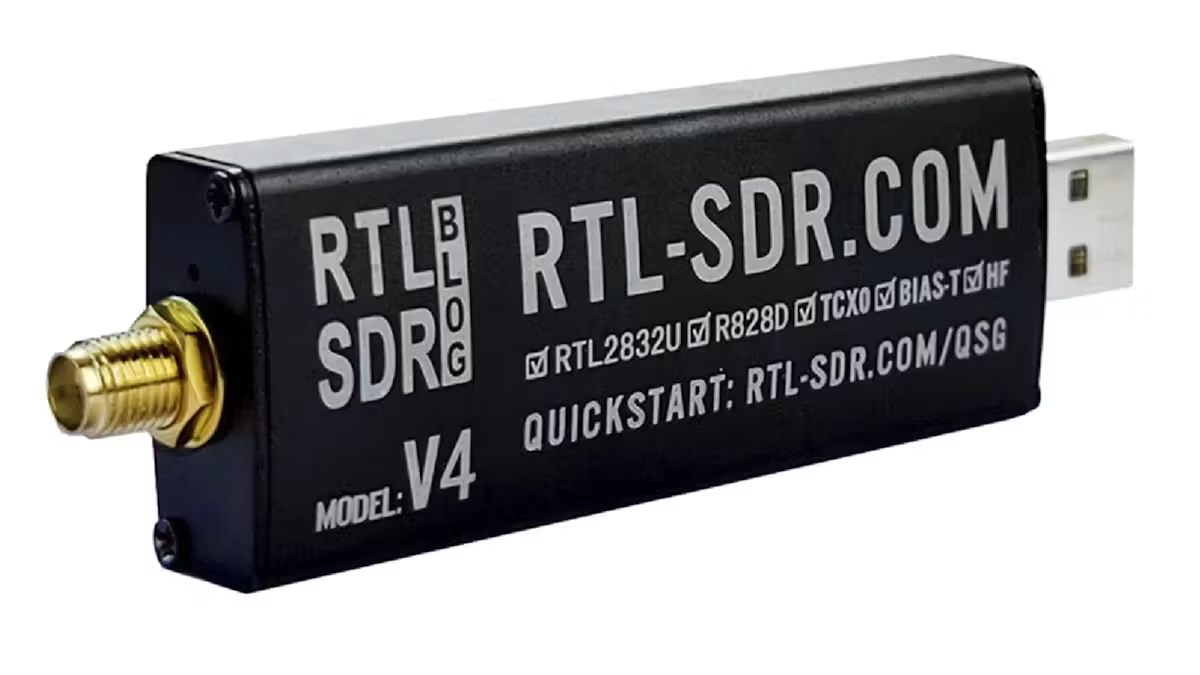
An RTL-SDR receiver is a USB software-defined radio originally based on DVB-T television tuner chips. Hobbyists discovered years ago that some of these TV tuner dongles could be repurposed as wideband radio receivers. Instead of only receiving digital television, they could be controlled by SDR software and tuned across a broad frequency range.
Modern RTL-SDR receivers are now purpose-built for radio hobbyists rather than television viewers. They usually include better oscillators, improved shielding, bias-tee power for active antennas or external accessories, better filtering, direct sampling or improved HF reception, and more stable operation than the earliest generic TV dongles.
A typical RTL-SDR receiver can cover roughly from the HF range up into the UHF range, depending on the exact model. In practice, the most convenient and strongest results are usually found from VHF upward: FM broadcast, airband, marine VHF, amateur 2-meter and 70-centimeter bands, ADS-B at 1090 MHz, weather satellite downlinks, pagers, telemetry and various local services.
HF reception is possible with some models, but shortwave listening is more demanding. Lower frequencies need larger antennas, better filtering, more attention to local electrical noise and often an upconverter or receiver design that handles HF better. This does not mean RTL-SDR is useless for HF. It means that beginners usually get faster success on VHF and UHF.
The key point is that the RTL-SDR is not a normal radio with fixed buttons for fixed services. It is a general-purpose receiver. The same device can be used for many different tasks simply by changing the antenna, frequency, modulation mode and software.
Why RTL-SDR is still popular in 2026
RTL-SDR remains popular because it offers a rare combination of low price, flexibility and educational value. Many radio devices are specialized. An airband scanner is good for aircraft communications. A weather satellite receiver may be optimized for satellite downlinks. A ham radio transceiver is designed around amateur bands. An RTL-SDR is not the best at every job, but it is good enough to let a beginner explore many parts of radio without buying a separate receiver for each one.
It also teaches the radio spectrum visually. With a traditional receiver, you tune one frequency and listen. With SDR software, you can see a block of spectrum at once. Strong carriers, digital bursts, wide FM signals, narrow voice channels, drifting beacons and interference patterns appear on the waterfall. This visual feedback makes radio easier to understand.
For technical users, RTL-SDR also connects radio to computing. It can be used with Windows, Linux, macOS, Raspberry Pi systems and many open-source decoders. It fits naturally into projects involving Python, GNU Radio, network streaming, remote receivers, signal logging, spectrum monitoring and data decoding.
The device is simple, but the learning path can become very deep. A beginner can start by listening to FM radio or airband. The same user can later build an ADS-B aircraft tracking station, decode weather satellite images, run OpenWebRX, compare antennas, analyze local interference or study digital modulation.
What you can receive depends mostly on the antenna
A common beginner mistake is to think of the RTL-SDR receiver as the main limiting factor. In many cases, the antenna and location matter more. A cheap receiver with a decent outdoor antenna will often outperform a better receiver connected to a tiny indoor antenna near a computer, router, monitor and switching power supplies.
Radio signals are not equally strong. FM broadcast stations are powerful and easy to receive. Local aircraft can be strong when they are high in the sky. ADS-B signals from aircraft are line-of-sight and can be received from long distances with a good 1090 MHz antenna. Weather satellites are weaker and need a suitable antenna and clear view of the sky. HF signals may require long wires and a quieter environment. Some local digital signals are extremely strong, while others are barely above the noise floor.
The antenna must also match the frequency range. A short telescopic whip may work for FM broadcast and some VHF signals. A small vertical cut for 1090 MHz is much better for ADS-B. A V-dipole or quadrifilar helix antenna can be useful for weather satellite reception. A discone antenna is a convenient wideband option for general VHF/UHF monitoring. A long wire may help on HF, but it may also collect a lot of local noise.
This is why the best answer to “what can I receive?” is always conditional. With the stock antenna indoors, you may receive only local FM broadcast, strong pagers, nearby repeaters and some aircraft. With an outdoor antenna placed high and away from noise sources, the same RTL-SDR can become dramatically more capable.
Aircraft communications and airband monitoring
One of the most popular uses for RTL-SDR is listening to aircraft communications. Civil aviation voice communications are usually found in the VHF airband between 118 and 137 MHz. These transmissions use AM modulation, not FM. This is important because many beginners tune to the correct frequency but choose the wrong demodulation mode in the software.
With an RTL-SDR and a simple VHF antenna, you can often hear aircraft talking to air traffic control, tower, approach, departure or area control frequencies. Reception depends heavily on distance, terrain and antenna height. Aircraft at altitude are easier to hear than ground stations because they have line-of-sight coverage over a wide area. The tower or ground controller may be much harder to receive unless you are close to the airport.
Airband monitoring is attractive because the signals are understandable even without decoding software. You tune the frequency, select AM mode, adjust the filter bandwidth and listen. It is also educational: you can learn aviation phraseology, callsigns, altitude reports, headings, runway instructions and handoffs between controllers.
The 8.33 kHz channel spacing used in modern European aviation can confuse beginners. The displayed channel name and the exact radio frequency are not always interpreted in the same way as older 25 kHz spacing. SDR software usually lets you tune precisely enough, but you need to use narrow AM bandwidth and fine frequency steps.
An RTL-SDR is not as convenient as a dedicated aviation scanner, but it has one major advantage: the waterfall display. You can see multiple nearby airband channels and quickly identify which ones are active. This makes it easier to discover local frequencies.
ADS-B aircraft tracking at 1090 MHz
ADS-B is one of the most rewarding RTL-SDR projects because it produces visible results quickly. Aircraft transmit position, altitude, speed, identification and other data on 1090 MHz. With the right software, an RTL-SDR receiver can decode these messages and display aircraft on a map.
This is not the same as listening to voice communications. ADS-B is digital data. The receiver captures the signal, software decodes the packets, and a map interface shows aircraft positions. With a good antenna, clear view of the sky and low-loss coax, reception range can be surprisingly large.
The antenna is especially important at 1090 MHz. Cable losses are higher at this frequency, so a poor coaxial cable or long cable run can reduce performance sharply. A small antenna placed outside or near a window may outperform a larger but badly located antenna indoors. Dedicated 1090 MHz antennas, filters and low-noise amplifiers can improve results.
ADS-B is also a good project for Raspberry Pi users. A small single-board computer can run continuously, feed a local map and optionally contribute aircraft data to online networks. The setup can be simple or advanced depending on how far you want to go.
For beginners, ADS-B has three advantages: the signal is common, the software is mature, and the result is easy to understand. You are not just hearing noise or looking at unknown signal traces. You are seeing real aircraft moving across a map.
Weather satellite reception
Weather satellites are one of the most fascinating things you can receive with an RTL-SDR. Instead of only hearing voice or decoding small data packets, you can receive images of cloud systems, coastlines, weather patterns and large-scale atmospheric structures.
The traditional beginner route was NOAA APT reception around 137 MHz. The method became famous because it allowed hobbyists to receive weather images using relatively simple equipment. In 2026, the weather satellite landscape is more mixed. Some older satellites continue to be discussed widely, while newer digital modes and different satellite systems have become increasingly important for hobbyists. A modern article or project should not assume that every old tutorial is still current.
Meteor LRPT and decoding tools such as SatDump are now central to many hobby weather satellite setups. Digital satellite reception can offer impressive results, but it requires more precise setup than simply listening to analog FM. You need the right frequency, suitable bandwidth, Doppler correction, correct decoding software, and an antenna with a reasonably clear view of the sky.
For basic satellite reception, a simple V-dipole antenna cut for the 137 MHz band can work surprisingly well. More advanced users may build or buy turnstile, QFH or other circularly polarized antennas. The antenna should be away from buildings and obstructions as much as possible because satellites move across the sky and signal strength changes during the pass.
Weather satellite reception teaches several important SDR concepts at once: Doppler shift, orbital passes, polarization, signal-to-noise ratio, bandwidth, decoding and antenna pattern. It is one of the best projects for users who want something more visual than voice monitoring.
Ham radio listening
An RTL-SDR receiver can also be used to listen to amateur radio activity. The easiest results are usually on VHF and UHF, especially local FM repeaters on the 2-meter and 70-centimeter bands. These repeaters often use narrowband FM, and they may carry local conversations, emergency exercises, club activity, nets or digital voice signals depending on the region.
Listening to amateur radio can be educational even if you do not transmit. You can learn callsign structure, repeater operation, band plans, propagation behavior and operating etiquette. On VHF and UHF, antenna height and local geography matter a lot. If you live in a valley or behind buildings, reception may be limited. If you have a high outdoor antenna, you may hear repeaters from much farther away.
HF amateur radio is also possible, but it is more complicated with a basic RTL-SDR. Shortwave ham bands use SSB, CW and digital modes such as FT8, FT4, RTTY and JS8Call. Receiving them properly requires adequate HF coverage, frequency stability, a suitable antenna and often additional software. Some RTL-SDR models can receive HF directly, while others work better with an upconverter.
For digital modes, the SDR software provides audio to decoding software. For example, FT8 signals appear as structured tones within a narrow audio passband. The SDR does not “understand” FT8 by itself; it only receives the radio signal. The decoding software does the rest.
A cheap RTL-SDR will not replace a good HF communications receiver, but it is useful for experimentation, monitoring and learning. It is also a convenient panadapter-style tool when paired with other radio equipment.
FM broadcast and RDS
FM broadcast radio is the easiest thing to receive with an RTL-SDR. The stations are strong, antennas are simple, and the software setup is straightforward. You tune between 87.5 and 108 MHz, select wide FM mode, adjust the bandwidth and listen.
This may sound too basic, but FM broadcast is actually a good first test. It confirms that the receiver, driver and software are working. It also teaches gain control, waterfall interpretation and frequency correction. Strong FM stations can also reveal overload problems. If the receiver gain is too high or the antenna is too strong, FM broadcast signals can create spurious images and false signals elsewhere.
Many FM stations also transmit RDS data, which can include station name, program information and other metadata. Some SDR software or external decoders can display this information. It is a simple example of receiving both audio and embedded digital data from the same broadcast.
FM broadcast reception is not the most exotic SDR project, but it is a practical starting point. If you cannot receive strong local FM stations, something is wrong with the setup.
Marine VHF and river traffic
Marine VHF is another useful target, especially near coasts, lakes, ports or major rivers. The marine VHF band contains voice communications used by vessels, harbors, marinas, locks and safety services. The most famous channel is Channel 16, the international distress, safety and calling channel, but many working channels exist.
Inland waterways may also use VHF communications, depending on the country and local regulations. Reception range is usually line-of-sight, so antenna height is again important. A simple outdoor VHF antenna can make a large difference.
Some marine systems also use AIS, the Automatic Identification System, commonly around 162 MHz. AIS is conceptually similar to ADS-B for ships: vessels transmit identity, position, course, speed and related information. With suitable software and antenna placement, an RTL-SDR can decode AIS and display ships on a map.
Marine monitoring is less universal than ADS-B because it depends heavily on location. If you live far from navigable water, you may hear little or nothing. But if you are near a river, harbor or coastline, it can be an interesting and relatively low-competition SDR topic.
Public service, business radio and local repeaters
Depending on your country, local regulations and radio systems, an RTL-SDR may receive various analog business, security, transport, industrial or public information channels. Some may still use analog FM. Others have moved to digital systems such as DMR, TETRA, P25, NXDN or other trunked networks.
This is where expectations must be realistic. Many modern professional systems are digital, trunked, encrypted or legally restricted. An RTL-SDR can receive the radio energy, but that does not mean you can or should decode the content. Encryption cannot be legally or practically bypassed by ordinary hobby methods. Even when signals are unencrypted, local laws may limit what you are allowed to listen to, decode, store or share.
From a technical perspective, these signals are still interesting. A waterfall display can show channel occupancy, bandwidth, signal strength and timing. You can learn to recognize analog FM, digital voice bursts, control channels, telemetry, paging systems and trunked radio behavior. However, responsible monitoring matters. Do not interfere, do not transmit, do not rebroadcast sensitive communications, and do not treat every receivable signal as fair game.
For a general audience article, this topic should be handled carefully. It is better to focus on legal reception, signal identification and spectrum education rather than sensational claims.
Pagers and legacy data systems
In many regions, pager systems still exist, especially in healthcare, emergency alerting, industrial operations or legacy infrastructure. Some pager signals can be received with RTL-SDR and decoded with appropriate software if they are unencrypted and legally monitorable in the user’s jurisdiction.
Technically, pager signals are interesting because they are strong, frequent and easy to identify on the waterfall. They often appear as narrow digital bursts or continuous data channels. They can be good examples for learning frequency correction, demodulation and decoding.
However, pager content can be sensitive. Even if the signal is easy to receive, publishing or misusing message content is not acceptable and may be illegal. The educational angle should be signal structure, not private information.
Legacy data systems are part of what makes SDR fascinating. Many older radio technologies continue to operate quietly in the background long after the public thinks they have disappeared. The spectrum is full of such systems: telemetry, alarms, paging, control links, identification beacons and industrial data.
Wireless sensors and ISM band devices
An RTL-SDR can receive many low-power devices in ISM bands, especially around 433 MHz, 868 MHz or 915 MHz depending on region. These may include weather stations, temperature sensors, tire pressure monitoring systems, remote controls, energy meters, doorbells, alarms and simple telemetry devices.
Software tools can sometimes decode common protocols used by consumer wireless sensors. This makes SDR useful for home automation experiments, security research and troubleshooting. For example, a user may identify whether a weather station sensor is transmitting, whether a remote control produces a signal, or whether a local device is flooding the band.
This is one of the most practical non-radio-hobby uses of RTL-SDR. You are not just listening to voice; you are observing the behavior of small wireless devices around your home.
Again, legal and ethical limits apply. Monitoring your own devices for troubleshooting is different from capturing and misusing other people’s data. SDR makes signals visible, but visibility does not automatically imply permission.
Shortwave broadcast and HF signals
Shortwave listening is possible with RTL-SDR, but it deserves a realistic explanation. Many beginners buy an RTL-SDR expecting to receive the entire world on a tiny antenna. Then they hear noise and assume the receiver is defective. In reality, HF reception is strongly affected by antenna length, local electrical noise, grounding, filtering, propagation, time of day and solar conditions.
Shortwave signals include international broadcast stations, amateur radio, time signals, utility stations, maritime and aviation HF channels, digital modes and various beacons. Some are strong, others are weak. Some are active only at certain times. Some frequencies open at night, others during the day. Solar activity can improve or disturb propagation.
For HF with RTL-SDR, a long wire antenna can help, but it may also overload the receiver or collect noise. A proper balun, common-mode choke, filtering and physical distance from electronics can make a huge difference. An upconverter may improve performance with older RTL-SDR models. Newer SDR hardware designed for HF may be a better choice if shortwave is the main goal.
Still, HF is worth exploring because it introduces the user to propagation. VHF and UHF are often local and line-of-sight. HF can cross continents under the right conditions. Even with modest equipment, receiving distant shortwave broadcasters or amateur radio signals can be impressive.
Digital amateur radio modes
Digital amateur radio modes are another area where RTL-SDR becomes more than a simple receiver. Modes such as FT8, FT4, WSPR, RTTY and JS8Call can be decoded by feeding received audio from SDR software into specialized applications.
FT8 and WSPR are especially interesting because they can be decoded at very low signal-to-noise ratios. Even if a signal is barely audible or not audible at all, software may still decode it. This makes them useful for propagation monitoring. You can observe which bands are open, which parts of the world are reachable, and how conditions change throughout the day.
An RTL-SDR can receive these signals, but HF setup quality matters. Frequency stability, sample rate, audio routing and antenna performance all affect decoding success. A cheap receiver is not always ideal, but it can be good enough for learning.
Digital modes also teach an important SDR lesson: not all radio communication is meant for human ears. Some signals sound like buzzing, tones or noise, but they contain structured information. SDR software plus decoding software turns those sounds into data.
Satellites beyond weather images
Weather satellites are only one part of satellite reception. With an RTL-SDR, users may also explore amateur radio satellites, telemetry beacons, cubesats and various educational satellite projects. Some satellites transmit simple beacons, voice repeaters or packet data. Others require more specialized software, better antennas or Doppler correction.
Satellite work is challenging because the signal is moving. The frequency shifts due to Doppler effect, the satellite pass lasts only a limited time, and antenna orientation matters. Low Earth orbit satellites rise, cross the sky and disappear within minutes. This makes reception more dynamic than listening to a fixed local transmitter.
For beginners, satellite reception can feel unpredictable at first. You need pass prediction software, correct frequencies, suitable antenna polarization and timing. Once it works, it is one of the most satisfying SDR activities because you are receiving a signal from an object moving hundreds of kilometers above Earth.
A cheap RTL-SDR is suitable for many receive-only satellite experiments. For transmitting through amateur satellites, however, you need licensed equipment and the appropriate amateur radio license.
Number stations, odd signals and spectrum mysteries
The phrase “mysterious signals” attracts readers, and SDR gives them a way to explore the mystery visually. The radio spectrum contains many signals that look strange to beginners: buzzing carriers, sweeping tones, pulsed transmissions, encrypted digital systems, radar-like patterns, drifting oscillators, spread-spectrum devices, telemetry bursts and unmodulated carriers.
Some signals are genuinely interesting. Others are mundane. A “mysterious” spike may be a local switching power supply. A strange digital burst may be a wireless sensor. A wide noisy block may be a computer monitor or USB cable. A repeating pulse may be telemetry, not espionage.
Number stations and military utility signals are often discussed in shortwave culture, but they should not be oversold. They exist as part of radio history and monitoring culture, but a beginner with a small antenna and noisy urban environment may not immediately receive dramatic secret broadcasts. The more useful article angle is how SDR helps identify unknown signals: frequency, bandwidth, timing, modulation, repetition, signal strength and direction.
This is where the waterfall becomes a learning tool. A user can compare unknown signals against known examples, record IQ samples, analyze bandwidth and experiment with demodulation modes. The mystery is not only in the signal itself, but in the process of identifying it.
Local interference hunting
One of the most practical uses of RTL-SDR is finding interference. Radio amateurs, shortwave listeners and even ordinary users may suffer from noise caused by switching power supplies, LED lamps, solar inverters, battery chargers, routers, computers, USB devices, powerline adapters or cheap electronics.
An RTL-SDR can show where interference appears in the spectrum. By moving the antenna, changing power circuits, switching devices on and off, or using a small loop antenna, you can identify possible sources. This is not a calibrated professional measurement, but it is extremely useful for hobby troubleshooting.
Interference often appears as regular combs, wide noise blocks, drifting carriers or repeating pulses. Some noise is conducted through cables, some is radiated directly, and some enters through the antenna feed line as common-mode current. Ferrite chokes, better power supplies, grounding changes, antenna relocation and filtering can reduce the problem.
A good SDR interference article can attract readers because many beginners ask the same question: “Why do I see signals everywhere, but hear nothing useful?” The answer is often not the receiver. It is the local RF environment.
Spectrum monitoring and signal discovery
RTL-SDR can be used as a simple spectrum monitoring tool. It is not a laboratory-grade spectrum analyzer, but it can show activity across selected frequency ranges. Users can scan bands, log signal strength, identify active channels and compare antenna performance.
This is useful for hobbyists who want to know what is active locally. Which airband frequencies are used nearby? Are local repeaters active? Where are pager signals? Is there strong FM overload? Is a wireless device transmitting? Which antenna receives better on a given band?
Some software can scan and record activity automatically. Others allow wide visual monitoring. Advanced users may write scripts to log frequencies, capture IQ samples or generate long-term spectrum plots.
This is where RTL-SDR becomes a measurement and discovery instrument. It may not provide certified accuracy, but it helps answer practical questions.
What you probably cannot receive well
An honest RTL-SDR article should explain limitations. A cheap RTL-SDR is powerful for its price, but it is not magic.
You cannot receive signals that are too weak for your antenna and location. You cannot decode encrypted communications simply because you can see the signal. You cannot receive mobile phone conversations in any practical or legal way. You cannot expect excellent HF performance with a tiny indoor whip. You cannot monitor every trunked radio system without specialized software, multiple receivers and legal clarity. You cannot treat an RTL-SDR as a calibrated measurement instrument. You cannot transmit with it.
Dynamic range is another limitation. Strong local signals can overload the receiver and create false images. This is especially common near FM broadcast transmitters, paging transmitters or strong local radios. Filters can help. Lower gain can help. Better antenna placement can help. But the receiver has limits.
The bandwidth is also limited. An RTL-SDR typically shows only a few megahertz of spectrum at once. That is enough for many tasks, but not enough for very wideband signals or large-band monitoring without scanning.
Understanding these limits prevents frustration. RTL-SDR is excellent when used for the right jobs. It is disappointing only when treated as a professional receiver, scanner, spectrum analyzer and satellite ground station all at once.
Best beginner projects
For a beginner in 2026, the best RTL-SDR projects are the ones that produce clear results quickly.
FM broadcast is the first test. It confirms that the driver, software and receiver work.
Airband monitoring is the next good step. It teaches AM demodulation, frequency tuning and real voice communications.
ADS-B tracking is one of the most satisfying early digital projects. It produces aircraft on a map and teaches antenna placement at 1090 MHz.
Weather satellite reception is a stronger intermediate project. It requires timing, pass prediction and better antenna planning, but the result is visually impressive.
Local repeater listening introduces amateur radio structure and VHF/UHF propagation.
Wireless sensor decoding teaches data reception and practical signal identification.
Interference hunting teaches real RF troubleshooting and helps improve every other project.
These projects form a natural learning path. You begin by listening, then decoding, then improving antennas, then analyzing signals.
Recommended software categories
The software ecosystem is one of RTL-SDR’s greatest strengths. Instead of thinking about one “best” SDR program, it is better to think in categories.
General SDR receiver software is used for tuning, listening and viewing the spectrum. Examples include programs designed for Windows desktop use, cross-platform SDR applications and web-based receivers.
Decoding software is used for specific signals such as ADS-B, AIS, weather satellites, pagers, digital voice, digital amateur modes or wireless sensors.
Satellite tracking software predicts passes, Doppler shift and antenna pointing information.
Audio routing tools connect SDR receiver audio to decoder programs.
Server software can turn an RTL-SDR into a remote receiver accessible through a browser.
Advanced tools such as GNU Radio allow users to build custom signal processing chains. This is not necessary for beginners, but it is one of the reasons SDR can grow with the user.
The best advice is to start simple. Install one general SDR program, verify reception with FM broadcast, then add one decoder project at a time.
Choosing the right antenna
A practical RTL-SDR article should include antenna recommendations because antenna choice determines success.
For FM broadcast, a simple telescopic whip is usually enough.
For airband, a VHF whip, discone or outdoor vertical works well.
For ADS-B, a dedicated 1090 MHz vertical antenna placed high and fed with low-loss cable is ideal.
For weather satellites around 137 MHz, a V-dipole is a common low-cost choice. More advanced antennas can improve reception.
For marine VHF and AIS, a VHF antenna near 156–162 MHz is suitable.
For UHF sensors around 433 MHz, a small quarter-wave or wideband antenna may work.
For HF, a long wire, active loop or upconverter-based setup may be needed, but local noise becomes a major factor.
For general scanning, a discone antenna is convenient because it covers a wide frequency range, though it is not optimized for every specific band.
No single antenna is perfect for everything. This is one of the most important lessons in radio. The receiver may tune broadly, but the antenna still obeys physics.
Indoor versus outdoor reception
Indoor reception is convenient but limited. Walls, metal roofs, insulation, reinforced concrete, windows with coatings, nearby electronics and low antenna height all reduce performance. Indoor antennas are also close to noise sources: computers, chargers, monitors, LED lights, routers and household wiring.
Outdoor reception is usually better. Even a modest antenna placed outside, higher and farther from electronics can outperform a more expensive indoor setup. For VHF/UHF, height and line-of-sight are especially important. For ADS-B, getting the antenna near a window or outside can dramatically increase aircraft count and range.
If outdoor installation is not possible, a window-mounted antenna or balcony antenna can still help. Moving the antenna just one or two meters can change results significantly. SDR makes this easy to test because the waterfall and signal strength display provide immediate feedback.
Gain settings and overload
RTL-SDR gain settings confuse many beginners. More gain is not always better. If gain is too low, weak signals disappear. If gain is too high, the receiver overloads and creates false signals, distortion and a raised noise floor.
The correct gain depends on antenna, band and local signal environment. Near strong FM broadcast stations, paging transmitters or cellular infrastructure, lower gain or filters may be necessary. With a small antenna and weak signals, higher gain may help.
A good method is to start with moderate gain and observe the noise floor. Increase gain gradually. If the noise floor rises but the desired signal does not improve, you are only amplifying noise or overload. If many fake signals appear across the waterfall, reduce gain or add filtering.
Understanding gain is one of the first real SDR skills. It teaches that reception quality is not only about making everything louder.
Filters, LNAs and accessories
Many RTL-SDR accessories are useful, but beginners should not buy all of them immediately.
An FM broadcast stop filter can help if strong FM stations overload the receiver.
A 1090 MHz filter and low-noise amplifier can improve ADS-B reception, especially with an outdoor antenna and longer coax.
A bias-tee can power active antennas or mast-mounted amplifiers if the receiver supports it.
An upconverter can improve HF reception with receivers that are not strong on direct HF.
Ferrite chokes can reduce common-mode noise on USB cables and coax.
Better coax can matter greatly at UHF and microwave frequencies.
The right accessory depends on the project. ADS-B benefits from 1090 MHz-specific components. HF benefits from noise reduction and antenna matching. Airband may benefit from VHF antennas and overload control. Weather satellites need the right antenna more than random amplification.
Legal and ethical considerations
An RTL-SDR receiver can tune across many frequencies, but radio law differs by country. Some transmissions are intended for public reception, such as broadcast radio, amateur radio, weather satellite downlinks and some navigation or identification signals. Others may be private, restricted, encrypted or sensitive.
Receiving is not always the same as being allowed to use, decode, store or share the content. In some jurisdictions, even listening to certain services may be restricted. Rebroadcasting, publishing, acting on private communications or attempting to defeat encryption can create legal problems.
A responsible SDR hobbyist should focus on legal and educational monitoring. Aircraft tracking, weather satellite reception, amateur radio listening, FM broadcast, personal sensor troubleshooting and spectrum learning are safer areas. Sensitive communications should be avoided.
This is not only about law. It is also about ethics. SDR gives ordinary users powerful visibility into the radio spectrum. That visibility should be used responsibly.
Why RTL-SDR is useful for education
RTL-SDR is one of the best educational tools in radio because it connects theory with direct observation. Concepts that seem abstract in textbooks become visible. Bandwidth, modulation, harmonics, noise floor, signal strength, Doppler shift, filtering, overload, aliasing and propagation can all be seen or tested.
Students and hobbyists can compare antennas, observe aircraft signals, receive satellite passes, decode data, measure local interference and explore how different frequencies behave. This makes radio less mysterious and more experimental.
It is also a bridge between electronics, computing and communications. A user may start by listening to airband and later learn Linux, networking, Python, digital signal processing, antenna design and RF troubleshooting. Few tools offer such a broad learning path at such a low cost.
Best article angle for SEO
For SEO, the strongest version of this topic should not be a dry device review. The best angle is curiosity plus practical value.
A title like “What can you receive with a cheap RTL-SDR receiver in 2026?” works because it matches beginner intent. People are not only asking what the device is. They want to know whether it is worth buying, what they can hear, what they can decode and whether it will work at home.
The article should answer these search intents:
Can I hear aircraft?
Can I track planes?
Can I receive weather satellites?
Can I listen to ham radio?
Can I decode digital signals?
What antenna do I need?
What software should I use?
What are the limitations?
Is it legal?
What should I try first?
This structure captures both informational and purchase-intent traffic. It also creates many internal linking opportunities. Each section can link to a dedicated future article: ADS-B with RTL-SDR, airband monitoring, SDR antennas, weather satellite reception, OpenWebRX, interference hunting, decoding wireless sensors and choosing between RTL-SDR, HackRF and SDRplay.
Internal linking ideas
From this article, link to future or existing pages about:
ADS-B aircraft tracking with RTL-SDR
Airband listening and 8.33 kHz channel spacing
Weather satellite reception with SatDump
Best antennas for RTL-SDR
RTL-SDR V4 versus HackRF versus PlutoSDR
How to identify unknown SDR signals
How to reduce SDR noise and overload
OpenWebRX on Raspberry Pi
Ham radio listening for beginners
Coax loss calculator or antenna length calculator
This article can become a hub page for the SDR category. That is important because broad beginner articles often attract the most traffic, while narrower technical articles convert that traffic into deeper pageviews.
A realistic beginner setup
A good beginner setup does not need to be expensive. Start with a reputable RTL-SDR receiver, a basic antenna kit and a computer. Install SDR software and verify reception with FM broadcast. Then try airband if you live within range of aviation activity. After that, try ADS-B with a suitable 1090 MHz antenna. If you want a more advanced visual project, move on to weather satellites.
The first upgrade should usually be the antenna, not the receiver. A better antenna position often improves results more than changing SDR hardware. The second upgrade may be filtering if overload is a problem. The third may be a project-specific antenna or amplifier.
For portable use, a laptop and small antenna can be enough. For permanent monitoring, a Raspberry Pi with an RTL-SDR can run continuously. For advanced use, multiple receivers can monitor different bands or decode multiple services.
The important point is to build gradually. SDR is a learning process, not a single purchase.
A cheap RTL-SDR receiver in 2026 can receive far more than most beginners expect. With the right antenna and software, it can monitor aircraft voice channels, track ADS-B aircraft, receive weather satellite signals, listen to amateur radio, decode wireless sensors, observe marine traffic, identify local interference and explore countless unknown signals on the waterfall display.
It is not a professional receiver, not a transmitter, not a universal decoder and not a magic key to every radio system. Its dynamic range, bandwidth and HF performance have limits. But as an entry point into the radio spectrum, it remains one of the most useful and affordable tools available.
The real value of RTL-SDR is not only what it receives. It changes how you think about radio. Instead of imagining the spectrum as empty space interrupted by a few broadcast stations, you begin to see it as a living technical environment: aircraft reporting their positions, satellites passing overhead, sensors sending data, repeaters carrying local conversations, transmitters drifting, noise sources polluting bands and hidden systems operating quietly in the background.
For anyone curious about radio, electronics, aviation, satellites, ham radio or signal analysis, an RTL-SDR receiver is still one of the best first steps. It is cheap, imperfect and limited, but it opens the door to a surprisingly large world.
Image(s) used in this article are either AI-generated or sourced from royalty-free platforms like Pixabay or Pexels.
This article may contain affiliate links. If you purchase through these links, we may earn a commission at no extra cost to you.
Get the weekly RF & IT briefing
Radio guides, RF calculators, AI, Windows, Linux and satellite communication explainers. One useful email per week. No spam.